What pages should a small business website have?
Most small businesses need about six pages, not twelve. The five that always earn their place, the extras that pay off by business type, and what to skip.
Entrovix AIAug 27, 2026 11 min read
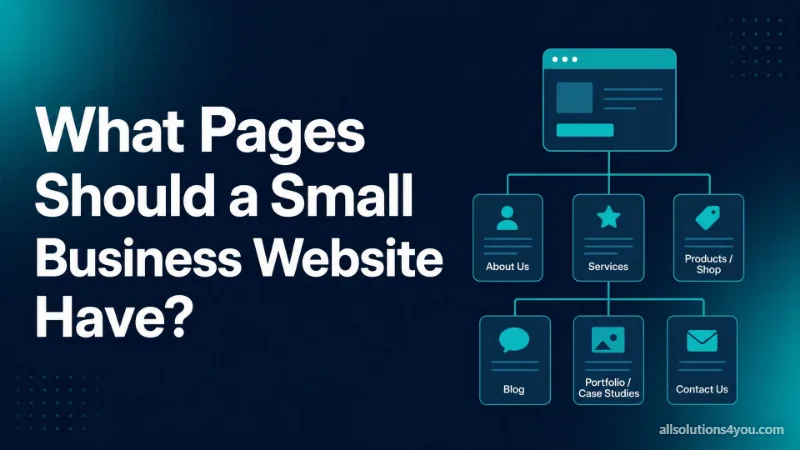
The standard answer to this question is a list of twelve pages. Home, About, Services, Blog, FAQ, Testimonials, Team, Careers, Gallery, Pricing, Contact, and something called Resources. Almost no small business needs all of that, and most would win more work with six pages done properly than with twelve done at seventy percent.
A page is not free. Somebody has to write it, somebody has to keep it accurate a year from now, and a search engine has to decide it deserves to rank against pages written by people who only care about that one topic. Thin pages do not average out across a site. They dilute it.
The short answer
Five pages always earn their place, whatever the business. Everything after that depends on what kind of business you run, and a restaurant has almost nothing in common with a B2B consultancy past those five.
- 1Home, which says what you do and who it is for before anybody scrolls.
- 2One page for each service you actually want more enquiries about. Not one page listing them all.
- 3About, with the real people who will do the work on it.
- 4Proof: the work, the results, the reviews, whichever you genuinely have.
- 5Contact, with every channel you actually answer.
Privacy policy and terms sit outside that count because they are compliance and trust items rather than pages that do any selling. The conditional pages, the pricing question and the pages that are usually a mistake are all below. If you want the version of this argument that is about layout and copy rather than site structure, designing a site that generates leads covers that ground.
The five that always earn their place
Each of these has one job. The reason so many small business sites underperform is not a missing page, it is five present pages where none of them is doing its job.
Home
Its job is to establish, in the first screen, what you do, who it is for, and where to go next. Concretely. Kitchen fitting in Pune with a fixed quote in 48 hours, not innovative solutions for modern businesses. The homepage is also the page least likely to rank for the work you want. It will rank for your business name. Your service pages have to do the rest, so the homepage should be routing people into them, not trying to be all of them at once.
One page per service you want more of
Note the wording. Not one page per service you are capable of delivering. If you would rather stop doing small repair jobs, do not give small repair jobs a page and a photograph and a form. The pages you publish decide the enquiries you get.
A service page that works names the service in the words customers use rather than your internal name for it, says who it is for, says what is included and what is not, says something about price, shows proof from that specific kind of job, and asks for one action.
About, with real people on it
This is not company history and it is not values. It is the page where a stranger decides whether you are a real business. Faces, names, where you are based, how long you have been doing this, anything checkable. A photograph of your actual workshop taken on a phone outperforms a stock image of four people in a glass meeting room, because the stock image tells the visitor you had nothing real to show.
Proof
Whatever form it takes for your business: finished projects, case studies, before and after photographs, a link to your reviews so they can be verified. The variable that matters is specificity. One named client with a described outcome beats a wall of logos, and a wall of logos beats the sentence about being trusted by many.
Contact
Phone number as a tappable link, email as a link, a short form, your address if customers can visit, your hours, and one line saying what happens after somebody submits. Do not list a channel nobody watches. An unanswered WhatsApp number costs you more than not having one.
| Page | The one job it must do | How you know it is failing |
|---|---|---|
| Home | Say what you do, who for, what next | Visitors arrive and leave without opening a service page |
| Service page | Win one specific search, then ask for the enquiry | It covers eight services and ranks for none of them |
| About | Show the people who will do the work | Stock photography and the words passionate team |
| Proof | Make your claims checkable by a stranger | A grid of untitled photographs |
| Contact | Remove every reason not to get in touch | Nine form fields and no phone number |
One page per service is the structure that actually works
This is the single most common structural mistake, and it is worth being blunt about. A page headed Our Services that lists eight things with a paragraph each will rank for approximately nothing, because nobody searches for our services. They search for emergency plumber in Andheri, or GST filing for freelancers, or shopify to custom store migration. Those are three different pages.
| One page listing every service | One page per service |
|---|---|
| One title tag covering eight topics | A title that matches what somebody typed |
| Ranks at best for your category name | Can rank for the specific job, and the place |
| The visitor scrolls to find their thing | The page is already about their thing |
| One paragraph to prove eight things | Proof from that exact kind of work |
| Nothing specific for articles to link to | A natural destination for every relevant post |
Keep the hub page as well. A /services page that lists and links to the individual pages is useful navigation, and it gives you somewhere for the broad category term to live. It just cannot be the only page. Which services deserve their own page is a keyword question as much as a business one, and choosing keywords for a new website is the process for deciding.
- Split by what the customer is trying to do, not by your internal service catalogue.
- Do not split into near-synonyms. A plumber page and a plumbing services page compete with each other, which is keyword cannibalisation and it helps nobody.
- Six strong service pages beat sixteen where ten were written to fill a template.
- Link every service page from the hub, and link related services to each other. Orphaned pages get crawled late and rank badly.
The conditional pages, by business type
These are the extras worth building, and only the ones on your row. Adding pages from somebody else's row is how a six page site becomes an unmaintained fourteen page site.
| Business type | Extra pages that pay off | What they earn |
|---|---|---|
| Local service business | A page per area you genuinely serve, plus one service-area page | Catches the service plus place searches, and sets expectations about how far you travel |
| Ecommerce | Category pages, product pages, shipping and returns | Category pages do most of the ranking; the returns page is where a hesitant buyer decides |
| Professional services and B2B | Case studies, industries served, pricing approach, team | Long decisions with several people involved, each page answering one objection |
| Restaurant and hospitality | Menu as text, booking, hours and location | The menu is the most visited page on the site and usually the worst built |
| Agency and creative | A detail page per project, plus a process page | Buyers judge on the work, then ask what working with you is like |
Four of those rows come with a rule attached, and the restaurant one is the rule people break most.
- If your menu is a PDF or a JPEG, it does not exist. Nobody can search it, a screen reader cannot read it, Google cannot index the dishes, and on a phone it is a pinch and zoom exercise. Put the menu in ordinary HTML text with prices. Keep the PDF for printing.
- Location pages need something real on each one. The same template with the suburb name swapped is the doorway page pattern, and it stopped working years ago. One office serving five neighbourhoods is one service-area page, not five location pages.
- On ecommerce, put descriptive text on category pages. A bare grid of thumbnails has almost nothing for a search engine to understand, and category pages usually outrank individual products.
- An industries served page is only worth writing if your offer genuinely differs by industry. If the page would say the same thing five times with a different noun, write one page.
The pricing question
Publish something about price. Not necessarily a full price list, but something. Refusing entirely loses more good enquiries than it filters out bad ones, because a visitor with no number in front of them assumes the worst and opens the next tab.
There are four honest ways to do it, and they are not equally persuasive.
| Approach | When it fits | How well it works |
|---|---|---|
| A starting figure, projects from X | Wide range of project sizes | Good. Sets a floor and filters the mismatches |
| A range with the things that move it | Custom work where scope varies | Better. The drivers teach the buyer how to brief you |
| A worked example of a real project | Services that are hard to describe abstractly | Best. Concrete, checkable, and hard to argue with |
| The method only, fixed quote after a call | Genuinely bespoke work | Weak on its own. Pair it with one example |
The usual objection is that every job is different. Every job is different for every business on that list, and a range with its drivers handles it fine. The second benefit is quieter: a number on the page ends the calls with people whose budget is a tenth of the work, and those calls are expensive. Put the pricing on the relevant service page too, not only on a separate pricing page. People decide where they are reading.
Legal and trust pages
If your contact form collects a name and an email address, or you run analytics, you are handling personal data and a privacy policy is the floor. Which law applies depends on where you and your visitors are, and that is a question for somebody qualified rather than a website checklist.
- Privacy policy: publish one as soon as any form or analytics script goes live.
- Terms of service: necessary if you sell or take payments online, optional on a pure enquiry site.
- Returns and refunds: mandatory in practice for ecommerce, and payment providers often want to see it before approving an account.
- A real address and a phone number that gets answered. Both do more for trust than any badge or slider.
These pages are compliance and trust items, not ranking ones. Nobody finds you through your privacy policy. Link them in the footer, leave them out of the main navigation, and do not spend a week on them.
Pages that are usually a mistake
- A services hub with no individual service pages beneath it. It ranks for nothing specific and asks the visitor to do the sorting.
- A blog nobody maintains. Four posts, the newest dated two years ago, is a live signal that the business may be dormant. If you cannot publish roughly monthly, put that effort into the service pages instead and read content that gets traffic and leads before you start.
- An FAQ page that repeats the service pages. Answer the objection where it arises. And if the plan was to add FAQ markup for the rich result, that is gone: Google stopped showing FAQ rich results on 7 May 2026 and withdrew support for the feature in June 2026.
- A gallery with no context. Twenty untitled photographs are decoration. Each image needs what it is, where it was, and what problem it solved.
- Coming soon pages left live. Either the page exists or it does not. An empty live page is a broken promise made in front of a customer.
- A team page for a team of one, and a separate testimonials page nobody navigates to. Put yourself on the about page and put each testimonial next to the claim it supports.
If you already have twelve pages
Then the work is subtraction, and it is worth doing carefully. Merge the thin pages into whichever version is already strongest, keep the best sentences from each, and redirect the old URLs to the survivor with a permanent redirect rather than deleting them. If the structure itself is the problem rather than the page count, the website redesign checklist sets out the order to work in.
- Find the pages nobody visits and nothing links to. Those are the merge candidates.
- Keep the URL that already has links pointing at it, even if the other page has the better title.
- After the merge, confirm the old paths land where you intended with the redirect checker, and fix any chains.
- Update the internal links to point at the new page directly instead of relying on the redirect.
The order to build them in
Build in the order that gets you an enquiry soonest, not the order the navigation will be in.
- 1The service page for the work you most want more of. Writing it first forces you to decide what you are selling, which makes every other page easier.
- 2Contact, working. Submit the form yourself and confirm the email arrives.
- 3Home, which mostly assembles what the service page already proved.
- 4Proof, with whatever you actually have. Three real jobs beat an empty case study template.
- 5About, with a photograph of the real people.
- 6The remaining service pages, one at a time, best first.
- 7Only then the conditional pages for your business type.
If the site is being built rather than repaired, this is the sequence our website design work follows for the same reason: the pages that earn money get finished first, while the budget and the attention are still there.
A site does not get more convincing by adding pages. It gets more convincing when each page it already has answers one question completely.
Questions people actually ask
Is a one-page website ever enough?
Sometimes. One service, one location, a business that gets most of its work by referral, or a site that needs to exist next week. The limit is structural: one page has one title, one description, and one intent it can satisfy. If you offer three services and want work in all three, one page will underperform three pages, and the gap widens over time.
Do I need a pricing page, or is pricing on the service page enough?
The service page is enough for most businesses, because that is where somebody is already thinking about the specific job. A separate pricing page earns its place when comparing options is the buying process itself, as it is with plans, packages or tiers.
What about a booking system or a client portal?
That is not a page, it is software attached to your site, and it should be budgeted and built as such. The difference between a website and a web application explains where the line falls and why crossing it changes the cost.
Should every page be in the main navigation?
No. The five essentials plus the conditional pages your business type needs, and nothing else. Legal pages go in the footer. A navigation bar with eleven items behaves like a navigation bar with none, because nothing in it stands out enough to click.
How often should these pages change?
Service pages when the offer or the proof changes, which for most businesses is a couple of times a year. Prices when they move. Proof whenever you finish something worth showing, which is the one page that quietly rots if nobody owns it. Editing a page for the sake of a fresh date does nothing.